I got the idea to play a bit THUG2 or THAW... but I switched months ago to Macintosh... SNAP there isn't ported a game yet. THPS2-4 are using the Mac Classic which is crap and has a lot of bugs :/ + THUG1-THAW doesn't exist there!
So I decided to port them on my own :)
Both games are fully functional with some small lags for the first mins. But it isn't possible to cap on your own. Maybe I'll find a way out. Still the best way is using Fraps on Windows.
I like Wine.
Showing posts with label MAC. Show all posts
Showing posts with label MAC. Show all posts
Monday, January 10, 2011

Wednesday, August 25, 2010
Finally! I'm on a MAC! :D
yeah you heard right ;)
Two weeks ago I went into a Gravis Store near me and bought a new MacBookPro 15" (:
I'm happy with it ... AND it has an working MacOS X!!!
No more hackint0sh crap ;) I'm done with it spending my time with it. I already tried to code for iPhone and tested an "Fortune Cookie App" where you have to click on a cookie which opens and shows your message ;)...
At the moment I'm waiting for my 80€ gift from Gravis to buy the Magic Mouse and the HDMI Adapt0r :( but why it takes so loooong
Damn you Gravis!
Two weeks ago I went into a Gravis Store near me and bought a new MacBookPro 15" (:
I'm happy with it ... AND it has an working MacOS X!!!
No more hackint0sh crap ;) I'm done with it spending my time with it. I already tried to code for iPhone and tested an "Fortune Cookie App" where you have to click on a cookie which opens and shows your message ;)...
At the moment I'm waiting for my 80€ gift from Gravis to buy the Magic Mouse and the HDMI Adapt0r :( but why it takes so loooong
Damn you Gravis!
Saturday, April 10, 2010
I need 3D Acceleration on my Hackint0sh!
As the title says, I srsly need an accel for my graphiccard to run more apps.
So I checked some forums and kernel extensions again but nothing helped. Cool I've found something interesting about the ATI 4830ies..... an acceleration kext.. http://rapidshare.de/files/46893369/accel.tar.bz2.html
oh geez the link is almost a year old and who the hell uploaded it onto rapidshare.de?
Netkas didn't showed any reactions on his blog yet. >> http://netkas.org
On Macrumors Cindori came up with
it's his FlashingTool http://www.groths.org/
And so I gave a try aaaaaaaaaand......
.... it didn't helped on my Club 3D Ati Radeon 4830.
Installing the Natit didn't came up with anything new.
well that driver patch thing just let the signal disappearing after booting up(apple logo-> blue screen with mouse-> black screen: lost signal).
so ive deleted all ati+natit crap to get back onto my hackintosh :/
I just need something to get 3D Acceleration and the Fullscreen resolutions >1680x1050.
The max resolution I can get is 1400x1050 trough boot.plist (I have written 1920x1080 in it).
I'd think that accel kext might help but nobody has it. :(
mh I tried installing that QECI Patch agn and it came up to this:
weird!
So I checked some forums and kernel extensions again but nothing helped. Cool I've found something interesting about the ATI 4830ies..... an acceleration kext.. http://rapidshare.de/files/46893369/accel.tar.bz2.html
oh geez the link is almost a year old and who the hell uploaded it onto rapidshare.de?
Netkas didn't showed any reactions on his blog yet. >> http://netkas.org
On Macrumors Cindori came up with
1 Word: zeus
it's his FlashingTool http://www.groths.org/
And so I gave a try aaaaaaaaaand......
.... it didn't helped on my Club 3D Ati Radeon 4830.
Installing the Natit didn't came up with anything new.
well that driver patch thing just let the signal disappearing after booting up(apple logo-> blue screen with mouse-> black screen: lost signal).
so ive deleted all ati+natit crap to get back onto my hackintosh :/
I just need something to get 3D Acceleration and the Fullscreen resolutions >1680x1050.
The max resolution I can get is 1400x1050 trough boot.plist (I have written 1920x1080 in it).
I'd think that accel kext might help but nobody has it. :(
mh I tried installing that QECI Patch agn and it came up to this:

weird!
Thursday, February 4, 2010
[MAC] Dual Boot + Resolution workaround
Cheers Dual Boot MAC OS X Leopard + Windows 7 is working better than expected :>!
My PC is booting... loading the Mac Chameleon Bootmanager where you can choose between the HDDs and the Windows one has a Windows logo :D. Thats nice!
As I already reported, I had the problem with the low resolution on my hackint0sh but yea i can't use any kext(kernel extension) yet because it might destroy the system. So I needed a workaround which is simply adding "Graphics Mode"="1680x1050x32" parameter while booting up.
So i downloaded the PlistEdit Pro and opened the Boot.plist @ /Library/Preferences/SystemConfiguration/com.apple.Boot.plist
and added:
Graphics Mode
1680x1050x32
Now its booting in my native resolution :).
Euuh not really :( its only 1400x1050. ~4:3 res? That isn't cool.
My PC is booting... loading the Mac Chameleon Bootmanager where you can choose between the HDDs and the Windows one has a Windows logo :D. Thats nice!
As I already reported, I had the problem with the low resolution on my hackint0sh but yea i can't use any kext(kernel extension) yet because it might destroy the system. So I needed a workaround which is simply adding "Graphics Mode"="1680x1050x32" parameter while booting up.
So i downloaded the PlistEdit Pro and opened the Boot.plist @ /Library/Preferences/SystemConfiguration/com.apple.Boot.plist
and added:
Now its booting in my native resolution :).
Euuh not really :( its only 1400x1050. ~4:3 res? That isn't cool.
[MAC] Can I install a Hackint0sh?
Hey,
I haven't writen for long time.
- New THPS-Modding related stuff will come when CHC fixed the hackthpsforums :(
- PCSX2: I'll try the newer revisions when I've fixed my computer and added Windows 7
Fixing PC?
Oh ya I've messed my last weeks around with trying installing Mac OS X on my PC. I tried a Snow Leopard x86 and two other Leopards(iDeneb v1 and Leo4All v3) but it didn't went good as I hoped. Two DVDs stopped installing the OS because of the Error: "Could not validate Essentials package"
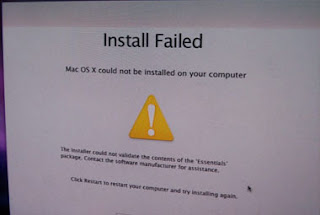
But hey, what about the third DVD? And so I tried installing from the last one... FAIL. There popped an other window that the DVD might be broken or something. OK!
So I wanted to stay on the EssentialError DVDs. Configuring BIOS, changing RAM and disconnecting IDE DVD Reader didn't helped. Well what to do?
Yes, let's load an other DVD. And so I downloaded an other DVD to try. Mac OS X Leopard 10.5.7 iDeneb v1.51 was the build. It started to install and BOOM finished installing. YAY! But it isn't done yet! I was dying to know what would happen when it is booting. Well next "error". The PC could'nt boot and hang up @ "Verifying DMI Pool Data...". Wow :(. Hm maybe... he is trying to boot from the wrong HDD? After changing the bootorder of my two HDDs it's finally booted up. Apple logo is showing up and then a blue screen flashed up and went to a black one. And no desktop or anything to see :(. That's evil weird. Because of that I got the idea to reinstall Mac OS X without any videocard drivers and it worked and bootet into Leopard. Nice! But the resolution is only @ 1024x768 and that sux :D!
Ok today I'll try to create a Dual Boot with Windows 7 and Mac OS X Leopard ;)!
I haven't writen for long time.
- New THPS-Modding related stuff will come when CHC fixed the hackthpsforums :(
- PCSX2: I'll try the newer revisions when I've fixed my computer and added Windows 7
Fixing PC?
Oh ya I've messed my last weeks around with trying installing Mac OS X on my PC. I tried a Snow Leopard x86 and two other Leopards(iDeneb v1 and Leo4All v3) but it didn't went good as I hoped. Two DVDs stopped installing the OS because of the Error: "Could not validate Essentials package"

But hey, what about the third DVD? And so I tried installing from the last one... FAIL. There popped an other window that the DVD might be broken or something. OK!
So I wanted to stay on the EssentialError DVDs. Configuring BIOS, changing RAM and disconnecting IDE DVD Reader didn't helped. Well what to do?
Yes, let's load an other DVD. And so I downloaded an other DVD to try. Mac OS X Leopard 10.5.7 iDeneb v1.51 was the build. It started to install and BOOM finished installing. YAY! But it isn't done yet! I was dying to know what would happen when it is booting. Well next "error". The PC could'nt boot and hang up @ "Verifying DMI Pool Data...". Wow :(. Hm maybe... he is trying to boot from the wrong HDD? After changing the bootorder of my two HDDs it's finally booted up. Apple logo is showing up and then a blue screen flashed up and went to a black one. And no desktop or anything to see :(. That's evil weird. Because of that I got the idea to reinstall Mac OS X without any videocard drivers and it worked and bootet into Leopard. Nice! But the resolution is only @ 1024x768 and that sux :D!
Ok today I'll try to create a Dual Boot with Windows 7 and Mac OS X Leopard ;)!
Subscribe to:
Posts (Atom)